Module 1.7: Reading
Digital tools for project and time management - Gantt chart
Create a Gantt Chart
To create a Gantt chart, gather the following information: a list of tasks, start and end dates for each task, task dependencies, task owners, and team members allocated to each task. Estimate the duration and resources required for each task, and be prepared to replan and reallocate resources as the project progresses. Keep in mind that a Gantt chart requires a list of tasks with start and end dates as the basic information, but additional details such as task dependencies and resource allocation can also be included, depending on the capabilities of the Gantt chart tool being used.
There is a great variety of Gantt chart software available but one can as easily create a Gantt chart in excel. There is a lot of content in video presentation but here is a quick overview.
Create a Gantt Chart in Excel (Forbes)
Let’s create a very basic Gantt chart in Excel so that you can see how easy it is to work with them.
1. List all the tasks in column A.
2. Write down the start and end dates in columns B and C for each task.
3. In column D, use the formula =C2-B2 to calculate the duration for each task.
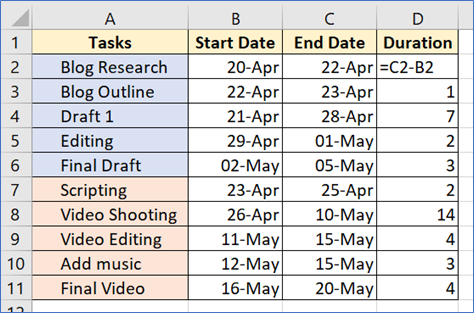
4. On the Insert tab, click on the Insert Column or Bar Chart option in the Charts group. Choose the 3-D horizontal layout and you get your Gantt chart area.
5. Populate with data and format the Gantt chart the way you want.
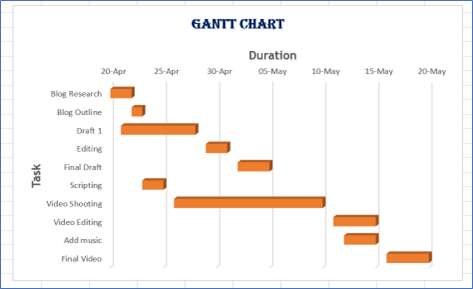
If you prefer not to start from scratch, you can download templates for creating Gantt charts off the internet. These templates come set up with headers and formulas so all you need to do is insert your information to get a chart quickly.
During which phase 1) of the project and 2) of the PDCA cycle can the project manager readapt his Gantt Chart?
Gantt chart software
Gantt charts are a project scheduling tool and thus included in almost all project management software. You can use Gantt chart software as a stand-alone desktop tool or an online version that can be easily shared with other stakeholders. If you are using a desktop Gantt chart software, you can only have one local version that can be updated just by you. Also, when you make changes you need to share a copy with others.
On the other hand, if you use online software, it can be easily updated and shared. You can even set it up to be updated automatically as the resources and allocated team members work on each task.
When researching Gantt chart software for your project management needs, be sure that it has these capabilities:
- Defining and updating milestones in your project
- Linking tasks according to predefined or customizable dependencies
- Collaborating on a dynamic project plan
- Share files in the form of text, images videos or notes summarizing tasks
- Monitor progress of each task against the planned one
Click up 
ClickUp makes it easier than ever to plan, organize, and collaborate on projects. With its powerful and customizable task management tool, you can get more work done and ensure everything completes on time. It is more a tool for businesses and free launchers but it for sure can apply in school educational systems and teachers. Google, Netflix, Airbnb and Nike are among big names that use ClickUp. Each edition has different capabilities but one has to pay for the most of them, the free version it is going to cover a teachers needs but not those of a whole organization.
Features
· Combination of suitable for project management tools
· Task toolbar (Gantt chart)
· Communication and collaboration tools
· Task assignments
· Statuses
· AlertsTeamGantt

TeamGantt brings project scheduling software online. You can now plan and manage your projects with this easy to use gantt software. Inviting your co-workers, teammates, students and friends to view and edit your gantt chart, is simple, fun and free.
Features
· Drag and drop options for simple use
· Option to see availability before assign the tasks
· Accessible from everywhere online
· Ability to track progress and produce reports
To conclude project management can be involved in every aspect of someone’s life especially the teachers and enhance their career. Although project management knowledge is only the first step as today’s world is evolving. Learning how to use project management tools can place you in a position to manage a great load of work, improve your decision making, organizational skills and time management skills. This in combination with other digital tools which were analyzed earlier and can highlight other skills of the individual such as leadership, communication, ability to motivate others and himself , be trustworthy and arrange conflicts is the path to a very productive and creative carrier.
Think of one time that you used project management principles without knowing?